

Table of Contents:
- Introduction
- Enabling User Auditing
- Method 1: Using “XrmToolBox” and “Get Last Login for Users”
- Method 2: Using “XrmToolBox” and “SQL 4 CDS”
Introduction
Recently, we wanted to carry out a Dynamics license clean-up exercise, and remove any users who had not used the system for a few months. We wanted to create an export with enabled users, and when they last logged in to Dynamics.
Enabling User Auditing
Data regarding the users last login date is only stored if “Log Access” is enabled. I recommend switching this on for all of your environments.
Go to Power Platform Admin Center
Click on the environment

Under Auditing, click on Manage

Enabled ‘Start Auditing’ and ‘Log Access’

Click Save
Method 1: Using “XrmToolBox” and “Get Last Login for Users”
If you have less than 500 users you can use the excellent tool ‘Get Last Login for Users‘, which runs in the also excellent XrmToolBox.
It is very easy to use:
- Download and run XrmToolBox
- Create a connection to your Dynamics environment
- Install the tool ‘Get Last Logged in time for CRM Users‘, and connect to your Dynamics environment
- Click the button ‘Get all Users Logins“
- Click the Excel button to export
Method 2: Using “XrmToolBox” and “SQL 4 CDS”
If, as in my case, you have more than 500 users you can export data to excel, and manipulate the data to show all users, and when they last logged in.
Download and Open spreadsheet
Install and configure SQL 4 CDS
- Download and run XrmToolBox
- Create a connection to your Dynamics environment
- Install the tool ‘SQL 4 CDS‘, and connect to your Dynamics environment
- You should now have something similar to the below

Get Active Users
Paste in the below SQL, which returns all active interactive users, excluding internal user accounts.
Press F5 to execute the query.
SELECT systemuserid, domainname, fullname FROM systemuser
WHERE isdisabled = 0 AND accessmode = 0
Select the results grid, press CTRL + A to select all, then right-click on the grid, and click ‘Copy‘

In the spreadsheet, in the tab ‘Active Users‘ paste the results into cell A2

Currently the column ‘Last Logged In” will show as #N/A. This is because we have not yet completed the process.
Get Last Logged In Values
Select all of column E by click on the header

Press Ctrl + C to copy these values
In XrmToolBox clear the current SQL, and then click in the SQL area, and then press CTRL + V to paste in the new SQL.
Press F5 to execute the query. This may take several minutes to run.
You should see similar to below:
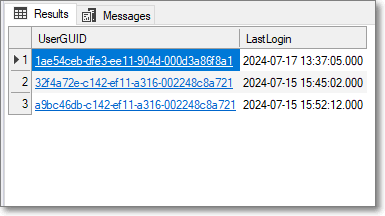
Select the results grid, press CTRL + A to select all, then right-click on the grid, and click ‘Copy‘.
In the spreadsheet, in the tab ‘Login SQL Output‘ paste the results into cell A2
Final Results
In the spreadsheet, the tab ‘Active Users‘ will now show the users, and when they last logged in:

I hope you find this useful 😊
 HARJIT SAMRAS BLOG